TMPlayer 1.27.0: casting, proxies and a top bar on the TV
 Nevil Krishna K13 min read
TMPlayer 1.27.0 came out on 19 October, four days after 1.26.0. It is 313 commits, about 615 new tests, and 356 new strings in each of 21 languages. The headline changes are casting to a Chromecast or Google TV, getting connected on a network where Telegram is blocked, and a new top bar on Android TV.
This post covers how those work, plus the smaller changes that shipped with them. It ends with how to install TMPlayer on a TV and how updates arrive, because that is the question I get most.
Everything here is from TMPlayer, which is GPL-3.0. It plays the videos already in your own Telegram chats and hosts or finds no media of its own, so it is for videos you own or have the right to watch (lawful use).
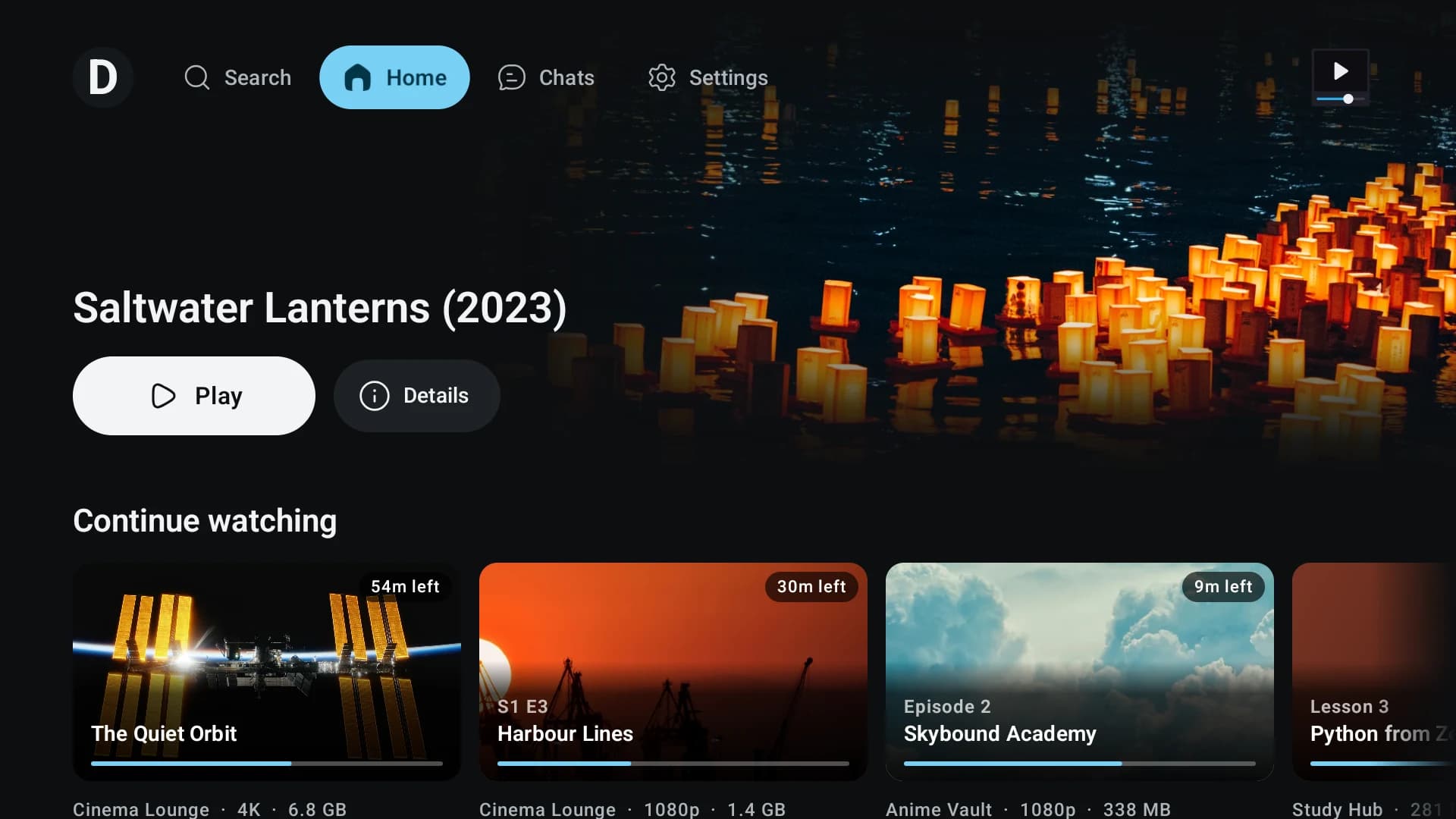
A top bar on the TV
Until 1.26, the TV app had a rail down the left side, which took width from every page. 1.27 replaces it with a bar along the top, holding your profile, Search, Home, Chats and Settings. Every page now gets the full width.
The bar comes with simple rules for the remote:
- Down from the bar goes into the page. On Home it lands on the carousel's Play button.
- Up goes back to the bar, but only once the page has nowhere further up to go, so a long grid still scrolls up first. You come back to the tile you left.
- Back anywhere in a page moves to the bar, on the tab for the page you are on. Back on the bar goes to Home, and only Back on Home's bar leaves the app.
Getting Back right needed two handlers, one for when the bar has focus and one for when it doesn't:
BackHandler(enabled = !tvBarHasFocus) {
    if (homeShown) TvBarSignals.homeToTop.tryEmit(Unit)
    runCatching { barFocus.requestFocus() }
}
// Back on the bar of any other page: Home, the remote still on the bar.
BackHandler(enabled = tvBarHasFocus && !homeShown) {
    tvSearchOpen = false
    onPickTab(BrowseSection.of(BrowseTab.Home))
    query = ""
    barRefocus++
}
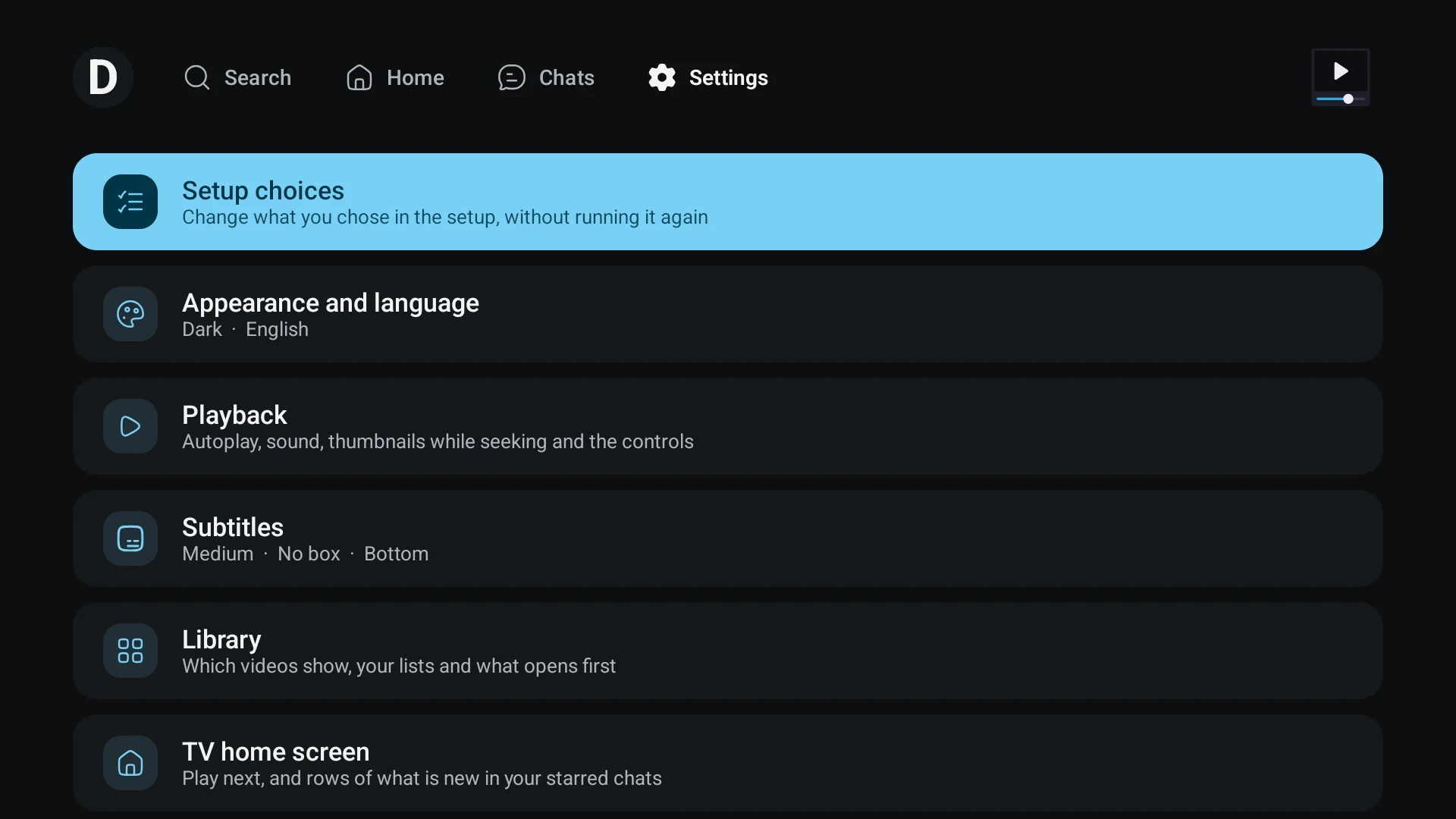
One bug only showed up on a device. Opening Settings from its tab let the page take focus as it appeared, so the remote ended up somewhere in the list instead of on the bar. Now, when a page opens from a tab, the bar keeps focus for up to 90 frames or until a key is pressed.
Casting, with the controls on your phone
You can now cast from the phone or the desktop to a Chromecast or a Google TV. The controls stay on the device in your hand, and when you stop casting, the video carries on locally from where the TV was.
A Chromecast plays from a URL, but a Telegram video only exists as a file that TDLib streams in pieces. So TMPlayer runs a small HTTP server on your phone or computer, and the TV fetches the video from it. The server is locked down in a few ways:
- It listens only on the local network address, not on every interface.
- Every path starts with a random token that changes each session.
- It turns away requests from outside private address ranges.
- It supports range requests, so the TV can seek on its own.
Every read goes through the same TDLib streaming path as normal playback. That means Low storage mode, Save mobile data and videos split into pieces all work while casting.
MKV. MP4 and WebM files are sent as they are. MKV was the hard one, since the receiver can't play it. The first version rewrapped MKV into fragmented MP4 on the fly. Testing on a real TV showed the receiver then didn't know how long the video was and couldn't seek properly. So 1.27 serves MKV as HLS instead, built on request:
- The video is cut at the keyframes listed in the file's own index (MKV calls them cues), into segments of about six seconds.
- Each segment is wrapped as MP4 only when the TV asks for it.
- Each audio track becomes a separate stream, so the TV switches between them itself.
Nothing is re-encoded.
/** How long a segment aims to be: a few keyframes, so a seek lands near and a fetch stays small. */
const val TARGET_NS = 6_000_000_000L
Codecs. Which video codecs a TV can play (HEVC, VP9, AV1, 10-bit) is judged from the model name it advertises. If the TV can't play the audio (DTS, TrueHD, PCM and a few others), the phone converts the audio to AAC. The picture is never converted. The desktop has no converter, so it doesn't offer that route.
Desktop. The desktop has no Google Cast library, so it speaks the Cast protocol itself:
- It finds receivers over mDNS.
- It opens a TLS connection to port 8009.
- It writes the protocol messages by hand, keeps a heartbeat going, and launches the TV's default media receiver.
Bugs from the device test:
- Lost place. When the receiver failed, it reported a position of 0, and that briefly became the saved place. In one test that lost an hour of progress. TMPlayer now trusts the TV's position only while it reports Playing, Paused or Buffering. After a seek, it waits until the TV is within 15 seconds of the requested time.
- Missing audio track. On a Mi TV Stick, the receiver silently dropped an E-AC-3 track and played AAC instead. The audio picker now lists only the tracks the TV actually kept.
- Subtitles. The subtitle files had a header written with
=where the HLS spec says:. The player inside the receiver rejected it and failed the whole video. That is fixed, with a test that runs the same player in headless Chromium. Subtitles still ship switched off in 1.27.0 until they pass another round on real hardware.
Connecting when Telegram is blocked
Before 1.27, a network that blocked Telegram looked the same as a slow one: a spinner that never ended. Now a status line shows what TDLib is doing: waiting for the network, connecting to a proxy, connecting, catching up, or opening.
After 12 seconds without connecting, it names the most likely reason and offers three buttons: Retry, Use a proxy and Send logs. The reasons are checked in order, with the most certain first:
fun hint(link: TelegramLink, network: NetworkFacts, proxyOn: Boolean): ConnectHint = when {
    link == TelegramLink.WaitingForNetwork -> ConnectHint.Offline
    network.known && network.status == NetworkStatus.Offline -> ConnectHint.Offline
    network.known && network.captivePortal -> ConnectHint.CaptivePortal
    proxyOn || link == TelegramLink.ConnectingToProxy -> ConnectHint.ProxyNotAnswering
    network.known && network.vpn -> ConnectHint.Vpn
    else -> ConnectHint.MaybeBlocked
}
"Maybe blocked" comes last because it can only be inferred from the other causes being ruled out.
Proxies. You can add an MTProto, SOCKS5 or HTTP proxy before you sign in or later from Settings. TDLib pings each one so you can see whether it answers. You can also paste a proxy link. The link parser accepts t.me, telegram.me and telegram.dog links, with or without https://, as well as tg://proxy and tg://socks. It also keeps the + signs that MTProto secrets contain, which a naive URL decoder turns into spaces.
Email codes. Telegram sometimes sends the sign-in code to an email address instead of the app, and TMPlayer now has screens for both steps of that.
Send logs. This is on every error screen: a share sheet on the phone, a file in the Download folder on the TV, and a "Report on GitHub" button on the desktop.
Part of this was an Android fix, not a new feature. Android was treating a network it hadn't finished checking as offline, and TMPlayer never told TDLib when the network changed.
Search across every chat
Search used to cover one chat at a time. In 1.27 it covers all your chats and the archive, shows one result per video, and has filters. You can also find a person, group or channel by @username, and tap a chat's name to see its picture, description and link.
Telegram's search returns one message type at a time, so each page of results runs two searches, one for videos and one for files, each 30 deep. The harder part is deciding which results are the same video. A file name alone isn't enough: "Lecture 1080p" in two different groups is two lectures. Two results merge only if they are the same file, or if the name carries a year or an episode code and the running times agree.
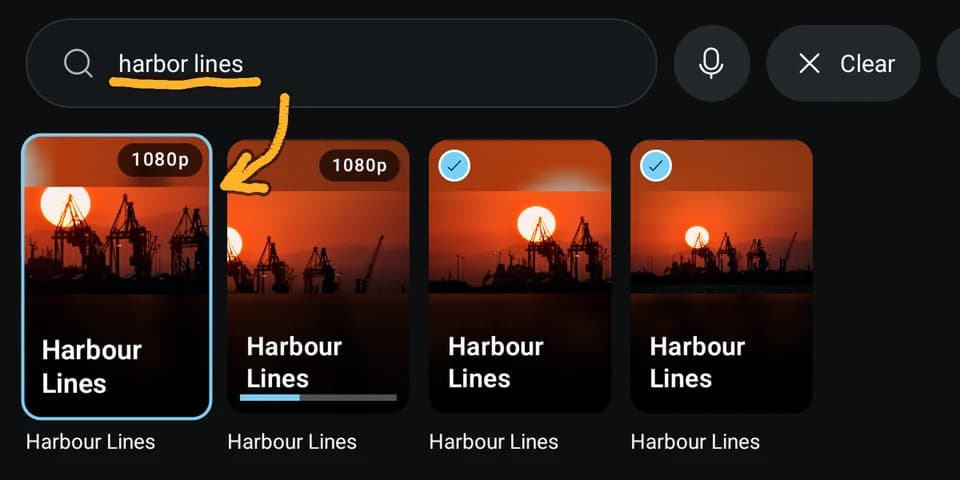
When a query finds nothing, TMPlayer tries again with just its longest word, because Telegram only matches one unbroken run of characters. It then filters those results against the full query. A resolution like "1080p" in a query is treated as a filter, not part of the title.
t.me links now open in TMPlayer too. A link to a post starts playing at the post's start time, and a link to a public chat or an invite shows the chat before you join.
Telegram's lighter copies
When you post a large video, Telegram makes smaller copies of it (720p, 480p) on its own servers. TDLib lists them alongside the original, and 1.27 uses them. TMPlayer keeps only copies that are both smaller in height and smaller in bytes than the original, one per height, preferring H.264.
The choice is automatic on a slow connection. A video's bitrate is its size divided by its length. If the measured connection speed is below 1.3 times the original's bitrate, TMPlayer picks the tallest copy that does fit, or the lightest if none does:
val line = lineBytesPerSec?.takeIf { it >= StreamStats.MIN_MEANINGFUL_SPEED } ?: return null
val need = rate(item.sizeBytes, item.durationSec)
if (need <= 0 || line >= need * HEADROOM) return null
val fits = item.qualities.filter { q ->
    val r = rate(q.sizeBytes, item.durationSec)
    r > 0 && line >= r * HEADROOM
}.maxByOrNull { it.height }
return Choice(fits ?: lightest, Why.SlowLine)
With Save mobile data on and the phone on mobile data, it caps at 720p. A download always keeps the original. Because every copy belongs to the same message, your place, the Watched mark and bookmarks carry across copies.
The same update brings Telegram's own seek previews: a small sprite sheet of frames that shows while you scrub. The format of the map file isn't documented, so the parser accepts a few shapes and falls back to treating the image as an even grid. A video's cover picture, when the poster set one, now replaces the automatic thumbnail on its card.
One card per video
Telegram channels often post the same video more than once, at different qualities or as a forward. 1.27 shows them as one card, and you pick the copy and quality from it. The matching is deliberately cautious, because a wrong merge is worse than a duplicate:
- The same file, or the same name at the same size.
- Running times within three minutes, and both on the same side of ten minutes, so a short clip is never matched with a full-length video.
- A year or an episode code in both names, with no running time disagreeing.
The viewer can always say "Not the same video", and that wins. Saved progress stays attached to each message, so a wrong merge costs a suggestion, never your place.
Videos cut into pieces (.part001, .001 and similar) now play as one. The player treats the pieces as one continuous stream and fetches only the piece it is reading. Archive volumes such as .7z.001 or .part1.rar are never mistaken for video pieces. If a piece is missing, TMPlayer names it and plays up to the gap.
The player, and the rest
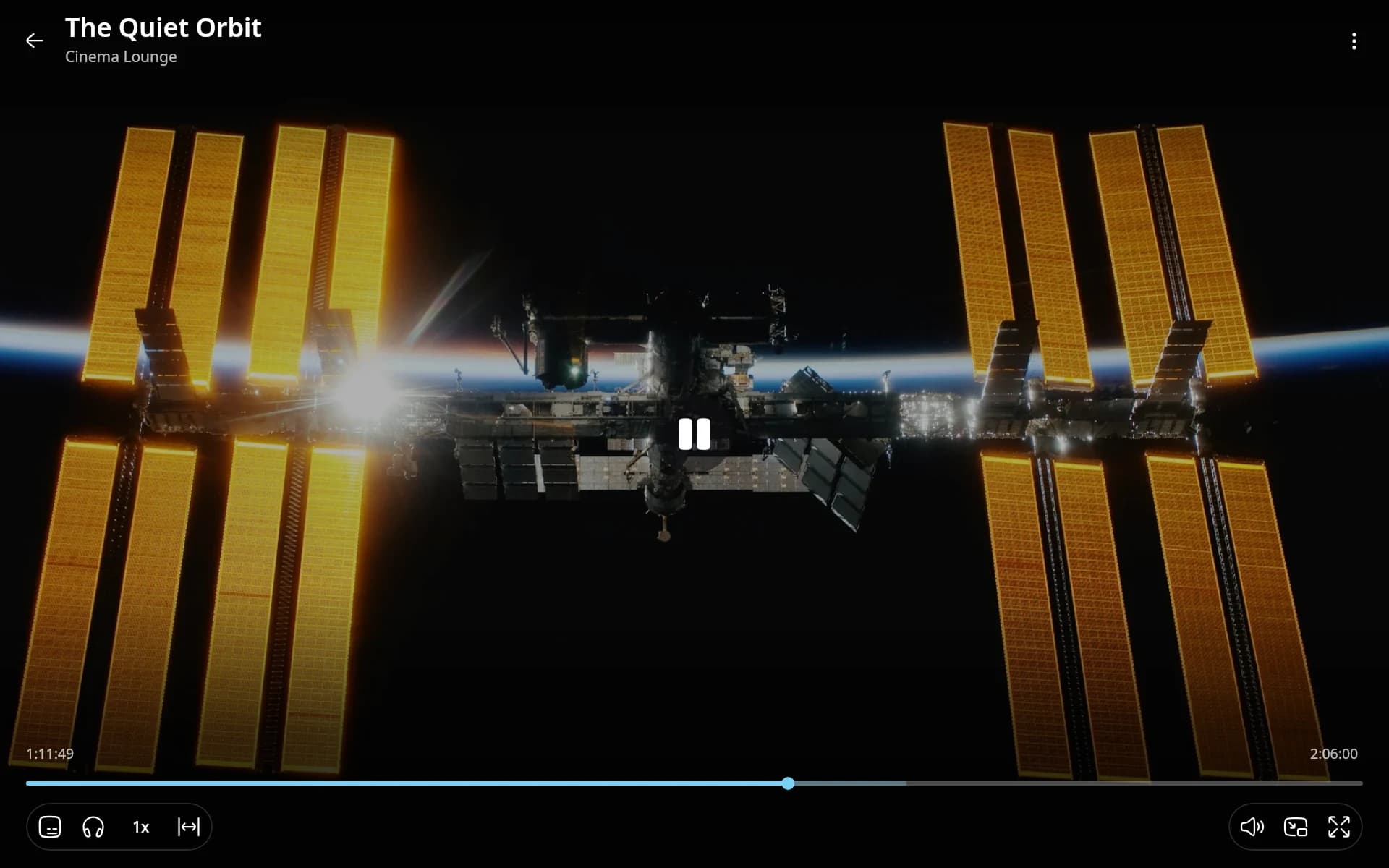
- Night mode compresses the sound so loud scenes stay quiet and dialogue stays audible. On Android it is a custom audio processor: a gain stage, then a compressor that follows the loudest channel. It lifts quiet dialogue by about 6 dB and brings full-scale peaks down to around -11 dBFS. The desktop's bundled FFmpeg has no compressor, so there it uses Dolby's own dynamic range data and keeps the centre (dialogue) channel up in the stereo mix.
- Back to where you were. After a jump of a minute or more, a "Back to 12:34" chip appears for six seconds. On a stream, finding your place again by hand costs a download per try, which is why it exists.
- Chapters, finer speed steps, picture shape on the bar, and subtitles at the same height on every video.
- Pure black for OLED screens, which also follows the system's dark mode, and nine accent colours.
- Connected devices shows where TMPlayer is signed in and can end those sessions without signing Telegram's own apps out.
- Storage shows a chart, lists everything on the device, and frees up space with Low storage mode.
- Notifications for new episodes of shows you watch, finished downloads, low storage and updates, each with its own switch.
- Titles and posters from TMDB now need more than a name match. A full-length video needs the year to agree within one, or the running time within five percent. The details page shows what the match was based on.
- macOS sign in now works on Macs without Homebrew, and there is a new installer window. On Windows, an update keeps TMPlayer and your sign in.
Installing it on a TV, and updating
TMPlayer isn't on the Play Store, so on a TV you sideload it. It runs on anything with Android TV or Google TV, including sticks and boxes. TVs running other systems (LG's webOS, Samsung's Tizen) can't run it, but a stick plugged into one can.
There are two ways to get it onto a TV:
- From your phone. Install a sideloading app on the TV, turn on wireless debugging, and send the APK across from your phone. This is the method I recommend.
- On the TV. Open tmplayer.org/apk in a browser on the TV and allow installs from unknown sources when asked. Some TV browsers block downloads, which is why the phone route is more reliable.
On a phone, download the APK, open it and allow the install. Windows, macOS and Linux have ordinary installers. Every platform has its own steps on the install page.
Download TMPlayer only from tmplayer.org or the GitHub releases. A copy from anywhere else has a different signature and won't update.
Updates come to you. TMPlayer shows a notice when a new version is out, and one tap downloads and installs it. If you missed the notice, go to Settings, About and help, Check for updates.
What I would do differently
Casting is the part I trust least. The first version passed its unit tests, and then the device test found four bugs in it: the lost place, the dropped audio track, the subtitle header, and a first tap on a TV that did nothing. Every receiver runs its own firmware, so more receivers will find more. Subtitles staying off in 1.27.0 is the honest result of that. I would rather ship a feature with one part switched off than one that fails a whole video.
What I would keep is that the hard decisions are pure functions in the shared core: the HLS cuts, the copy picker, the same video test and the connection hint. That is why one test suite covers the phone, the TV and the desktop, and why a fix found on the TV reaches the other two the same day.
- Kotlin
- Android TV
- Chromecast
- TDLib
- HLS
Building something like this?
Tell me what you are building. You get a fixed scope and a fixed figure back, from the person who writes the code.
5.013 reviews onGoogle