A Kerala calendar for Waybar, with gazette holidays and Malayalam dates
 Nevil Krishna K8 min read
The question I ask a calendar most is whether I work that day. Waybar's clock can show a month in its tooltip, but the tooltip is static text: no holidays, nothing to hover, nothing to click. So the 2nd Saturdays, the four days of Onam and the gazette holidays lived on the paper calendar by the door. I built a popup that does that job from the status bar: Kerala government holidays, the Malayalam (Kollavarsham) date for every day, and a layout taken from the wall calendars that hang in most Kerala homes.
It is about 1,300 lines of Python and GTK 3 with no pip packages, and it has its own repo, kerala-calendar, besides living in my dotfiles, swaydots. It was made for Sway, but it runs on other Linux desktops too, X11 and GNOME included. The install steps are below.
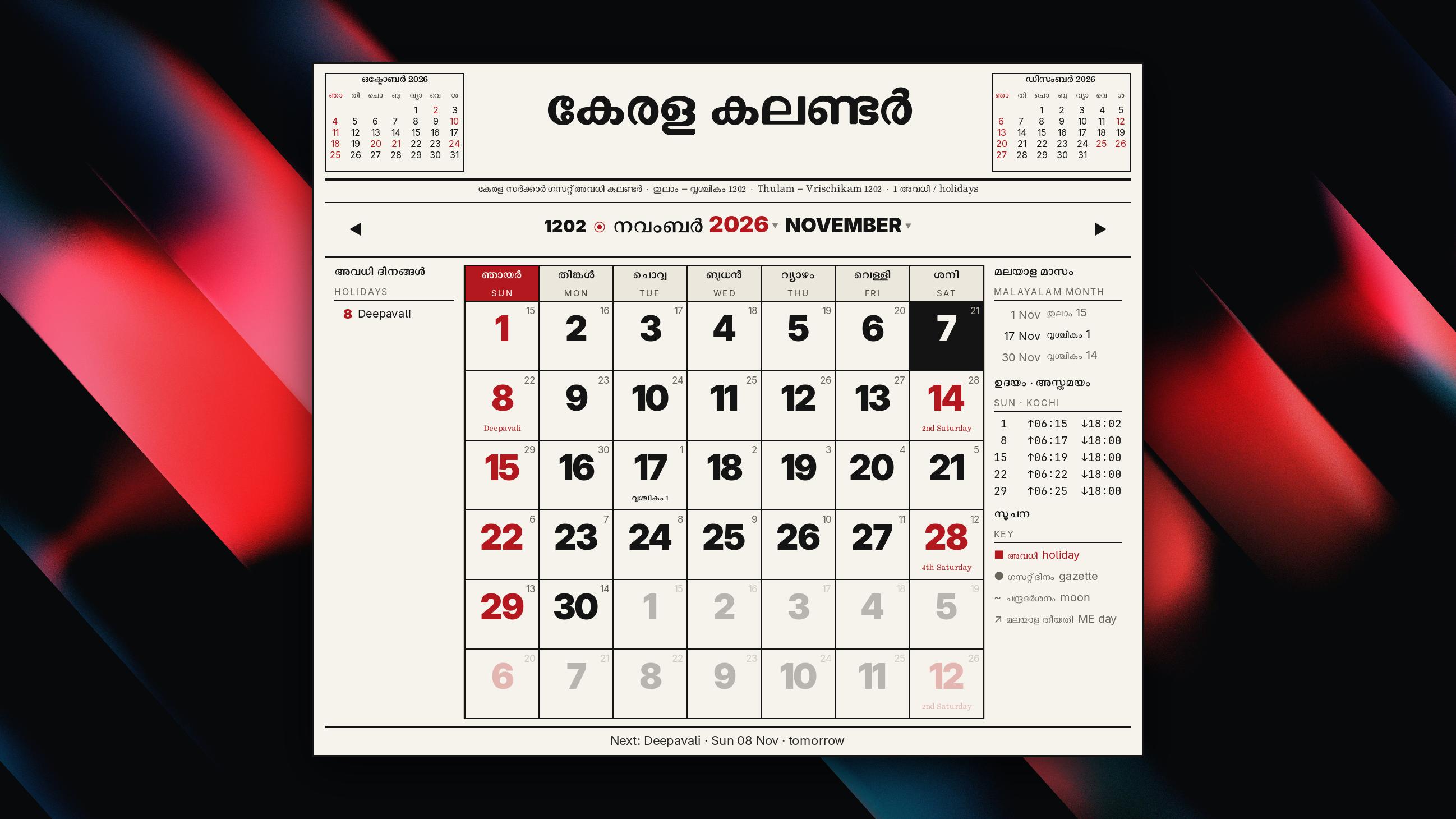
What does the calendar show?
Clicking the clock in Waybar, or pressing Super+Shift+D, opens the popup under the bar. Each day has a big date, red when it is a day off: Sundays, the 2nd and 4th Saturdays, and the fifteen holidays I get at an IT job. The Malayalam date sits in the corner, and on the day a Malayalam month starts the cell names it (വൃശ്ചികം 1 on 17 November). A holiday's name sits at the bottom of its cell. Kerala gazette days I do not get off are grey with a dot, so I still know the bank and the school will be shut.
Around the grid are the previous and next months (click one to jump), the month's holidays on the left, sunrise and sunset at Kochi for each week on the right, and the next holiday along the bottom. Headings are in Malayalam with English under them.
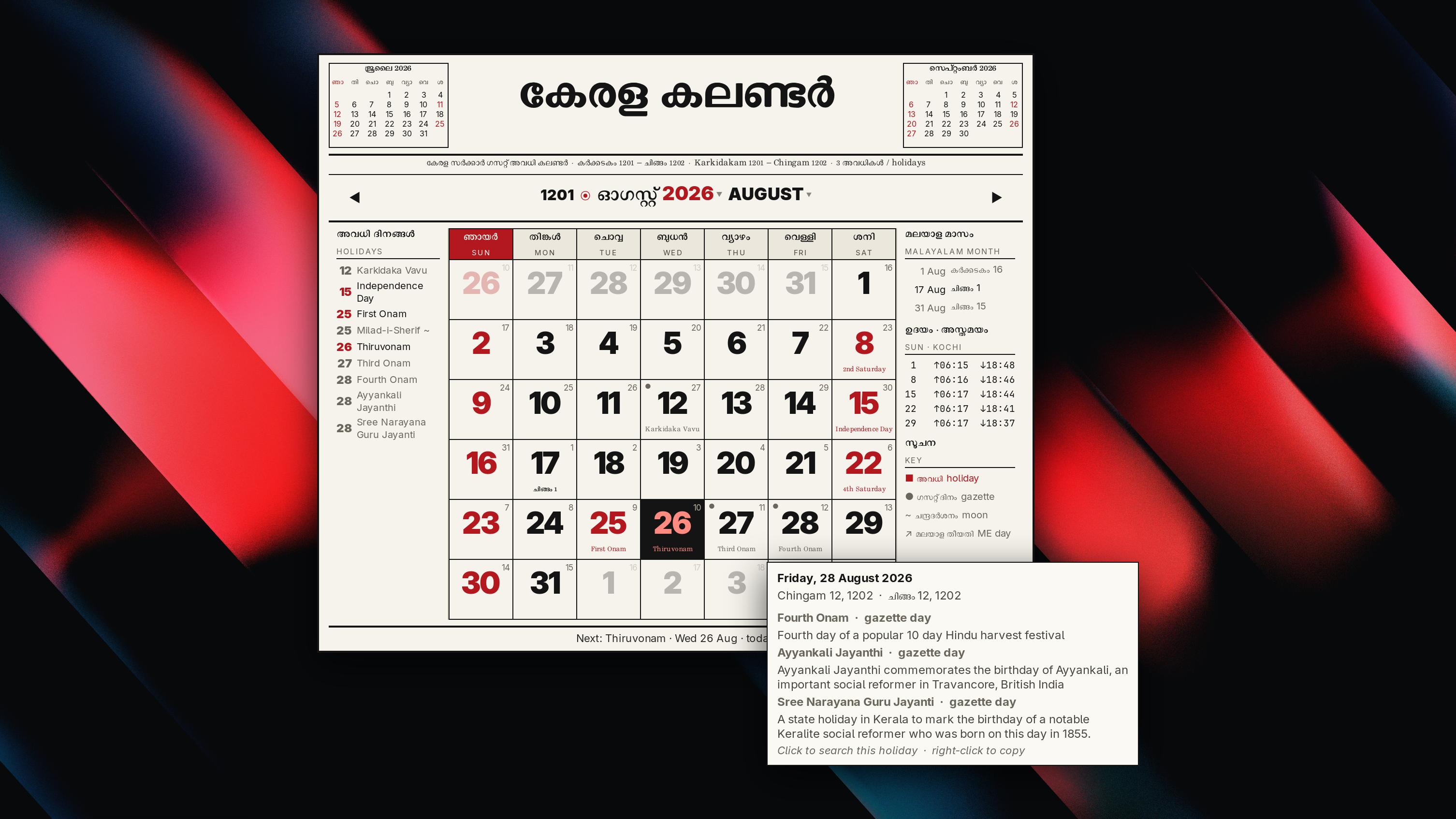
Hovering a day shows a card with the date in both calendars and the reason for each holiday on it. Clicking a holiday searches the web for it, and right-click copies it. The keyboard works too: arrows move by a day or a week, Page Up and Page Down by a month, T jumps back to today and Esc closes the popup. The scroll wheel changes the month.
Where do the Kerala holidays come from?
Kerala publishes its holidays as a gazette PDF each year, and there is no API. Two public calendar feeds cover it:
- The officeholidays.com Kerala feed is the main source. It follows the gazette (31 days in 2026) and gives a one line reason for each day, which is what the hover card shows.
- Google's public Indian holidays calendar fills the gaps. It covers 2021 to 2031 without reasons, and it has New Year's Day, which the Kerala feed leaves out.
The popup never waits on the network. It reads a cache in ~/.cache/kcal/holidays.json and refreshes it in a background thread once it is a week old. On a first run with no network, it uses a snapshot of 2026 and 2027 that ships in the repo.
People type these feeds, so there are typos ("Vijayasasami") and surprises, like Bakrid on both 27 and 28 May 2026. Holidays are matched by normalised keywords rather than exact names, and only the first date of a holiday in a year turns red. Days that depend on the moon (Eid, Bakrid, Milad-i-Sherif, Muharram) carry a small ~ and are marked tentative, because the gazette date can move once the moon is sighted.
Which days are red is a list in it_set.json, from New Year and Republic Day to Christmas, Eid and Good Friday. A second file, holidays-custom.json, wins over both feeds: it can add, remove or rename a day, or force one red or grey.
How is the Malayalam date worked out?
Kollavarsham is a solar calendar. A month starts when the sun enters the next sign of the zodiac, measured against the stars, so Chingam, the first month, starts around 17 August. There is a kollavarsham package on PyPI, but it is built with jsii and needs Node at runtime, which is a lot to carry for a popup. malayalam.py does it in 150 lines:
- Work out the sun's longitude with the low precision formula from Jean Meeus's Astronomical Algorithms, then subtract the Lahiri ayanamsa to get its position against the stars.
- Search for the moment it crosses each 30 degree boundary. Chingam starts at 120 degrees.
- Apply the Kerala rule for the day. If the crossing comes before three fifths of the daytime has passed (sunrise to sunset at Kochi), the month starts that day. Otherwise it starts the next day.
- Take the year from the Gregorian one: subtract 824 from Chingam 1 onwards and 825 before it. 17 August 2026 was Chingam 1, 1202.
Fourteen unit tests pin Chingam 1 across several years and keep a table of every month start from 2020 to 2035, so a change to the maths shows up as a failing test. They run in a fifth of a second.
One date is still open. For Vishu 2026 (Medam 1), my code says 14 April: the sun crossed at 09:12 IST, well before the cutoff, and Google's calendar agrees. The Kerala gazette says 15 April. If you have a printed 2026 Malayalam calendar, I would like to know which one it shows.
How does a popup stay a popup on Sway?
Sway tiles every normal window, so a GTK window opened from Waybar lands in the layout next to the browser. The popup uses gtk-layer-shell instead, the same protocol Waybar uses for itself. It sits on the overlay layer, anchored to the top right 6 px under the bar, and takes keyboard focus only when it needs it, so Esc works without stealing focus from the window you were in.
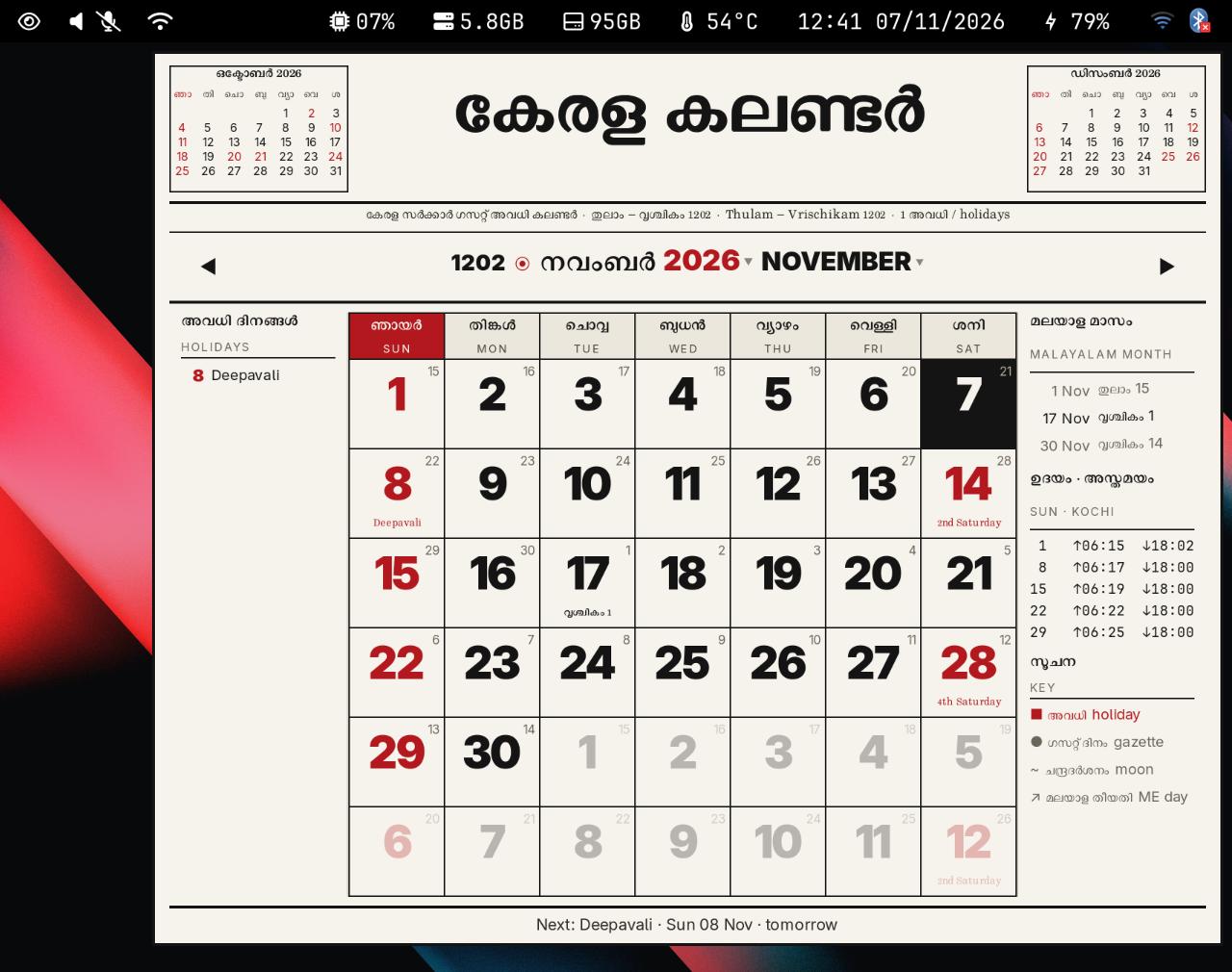
Closing it took two tries. The first version closed when it lost focus, and with focus following the mouse, moving the pointer toward the popup took focus away and shut it at once. The version I kept puts an invisible full screen layer under the popup, and a click anywhere on it closes both. A pid file makes the clock a toggle, so a second click closes the popup instead of opening another one.
Some desktops have no layer-shell: GNOME, and anything on X11, such as i3, Openbox or XFCE. There the popup falls back to a plain undecorated window that stays on top. On X11 it opens at the pointer; on GNOME the desktop chooses where. It closes when it loses focus, but stays open while the month or year menu has focus. With focus-follows-mouse, moving the pointer off the window closes it, which is the problem layer-shell avoids on Sway.
Install it
The calendar has its own repo, kerala-calendar, and its README has the details for each desktop. Clone it and run the installer:
git clone https://github.com/dracu-lah/kerala-calendar.git ~/.local/share/kcal
~/.local/share/kcal/install.sh
install.sh installs the packages with dnf, pacman or apt, writes a starter config to ~/.config/kcal/config.json and renders one test frame. Add --no-deps to skip the packages. I run it on Fedora 43; the Arch and Debian lines are untested. The Malayalam text needs a Malayalam font: the screenshots use Rachana, and Noto Sans Malayalam works too.
# Fedora
sudo dnf install python3-gobject python3-cairo gtk3 gtk-layer-shell jq wl-clipboard rit-rachana-fonts
# Arch
sudo pacman -S python-gobject python-cairo gtk3 gtk-layer-shell jq wl-clipboard noto-fonts
# Debian, Ubuntu
sudo apt install python3-gi python3-gi-cairo gir1.2-gtk-3.0 gir1.2-gtklayershell-0.1 jq wl-clipboard fonts-smc-rachana
gtk-layer-shell is optional: without it the popup opens as a plain window.
In ~/.config/waybar/config, replace "clock" with "custom/clock" in your modules list and add the module:
"custom/clock": {
  "exec": "~/.local/share/kcal/clock.sh",
  "return-type": "json",
  "interval": 30,
  "on-click": "~/.local/share/kcal/kcal.py --toggle"
}
It shows the time and date, and its tooltip names today's holiday. Your old #clock CSS rules do not reach it, so add #custom-clock next to them. Then reload Waybar with pkill -SIGUSR2 waybar.
To open it from a key, bind ~/.local/share/kcal/kcal.py --toggle:
- Sway or i3:
bindsym $mod+Shift+d exec ~/.local/share/kcal/kcal.py --toggle - Hyprland:
bind = SUPER SHIFT, D, exec, ~/.local/share/kcal/kcal.py --toggle - GNOME or KDE Plasma: add a custom shortcut in the keyboard settings with that command.
To check the popup renders before wiring anything up, draw a month to a PNG:
~/.local/share/kcal/kcal.py --screenshot aug.png --month 2026-08 --scale 2
The calendar screenshots in this post came from that command, with --hover 2026-08-28 for the card, placed over my wallpaper. The Sway one is a grim capture of my screen.
If you use swaydots itself, the calendar is already in place at .config/waybar/scripts/kcal, and kerala-calendar is that folder on its own.
Make it yours
~/.config/kcal/config.json holds the settings, and every key is optional:
{
  "masthead_text": "കേരള കലണ്ടർ",
  "masthead_image": "",
  "masthead_height": 88,
  "search_command": [],
  "search_url": "https://www.google.com/search?q={query}"
}
- Title:
masthead_textis the big title. For a logo, setmasthead_imageto a PNG, SVG or JPEG. A relative path is read from~/.config/kcal/, and the text comes back if the image fails to load. No newspaper branding ships with the calendar, so the default is the plain Malayalam for "Kerala calendar".--masthead "Title"and--masthead-image logo.pngoverride the config for one run. - Browser: clicking a holiday opens a search in your default browser. Set
search_command, for example["firefox", "--search", "{query}"], to choose the browser. - Colours and fonts: a
style.cssin~/.config/kcal/loads after the built-in one, so you only copy the rules you change. - Red days: edit
it_set.jsonto match the holidays you get. - One-off fixes: add a day your office gives, or correct one the feed gets wrong, in
holidays-custom.json.
What it does not do
It only knows Kerala. Another state needs its own feed in data.py, though the Saturday rule and the custom file would carry over. It speaks English and Malayalam only. Moon dependent holidays are as good as the feed until the gazette confirms them. Outside Sway I have tested it only under XWayland and as a plain Wayland window on Sway, not on a real GNOME, KDE or X11 session, so reports from those are welcome.
The code is in kerala-calendar. Bug reports, fixes and stars are welcome there. It is also part of swaydots, under .config/waybar/scripts/kcal.
- Linux
- Sway
- Waybar
- Python
- GTK
- Malayalam
Building something like this?
Tell me what you are building. You get a fixed scope and a fixed figure back, from the person who writes the code.
5.013 reviews onGoogle